AI horror video generator: six scenes that build dread
This AI horror video generator page gives you six original horror scenes written for Kling 3.0 text to video in Koor AI. Each one borrows a mood from this year's horror slate — liminal corridors, a fairground mascot, a van that should not be out this late — without copying any film, and each is built around a sound cue, because in horror the audio does half the work.
Six original scenes, each one continuous shot with a single scare. The prompt names the subject, the setting, one camera move, the light and what you should hear. Use them as they are or swap one detail — the location, the colour of the light, the sound — to make the scene yours.
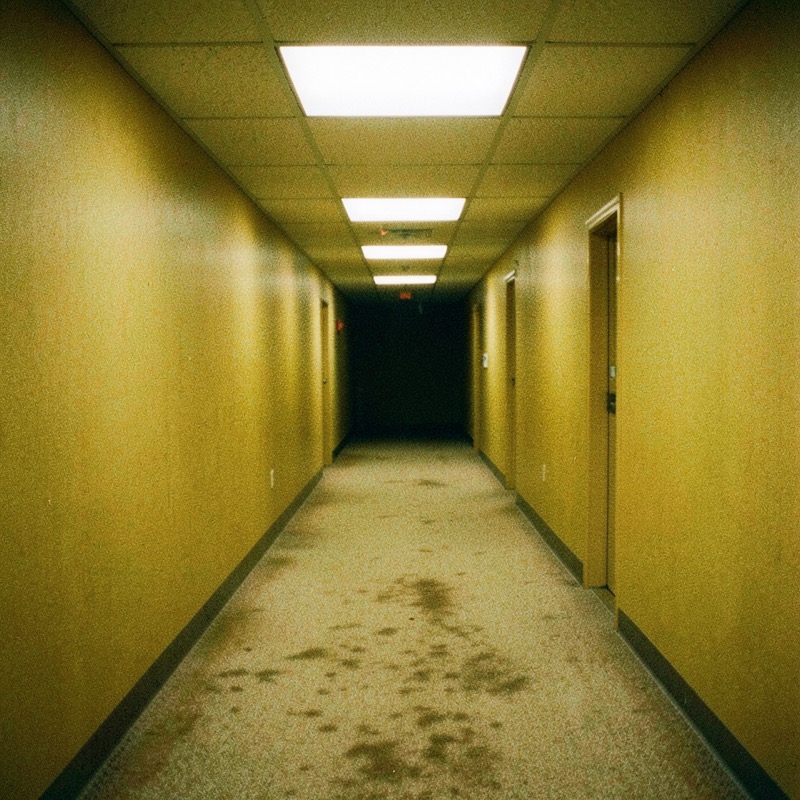
Yellow Hallway Loop
An empty office corridor of mustard wallpaper and humming lights that never ends. The scare is that nothing changes — until one light goes out.
Text-to-video prompt · Kling 3.0
One continuous shot. A slow, steady walk forward at eye level down an endless empty office hallway: damp mustard-yellow wallpaper, stained beige carpet, rows of fluorescent ceiling panels with a constant electrical hum. The corridor turns a corner ahead, and when the camera reaches it, the next stretch of hallway looks exactly the same. Near the end of the clip, the panel directly above the camera flickers and goes dark. Flat, slightly overexposed light with a faint VHS softness. Sound: loud fluorescent buzz, muffled carpet footsteps, the click of the dying light, then silence. No people, no monsters, no text or signs, no cuts.
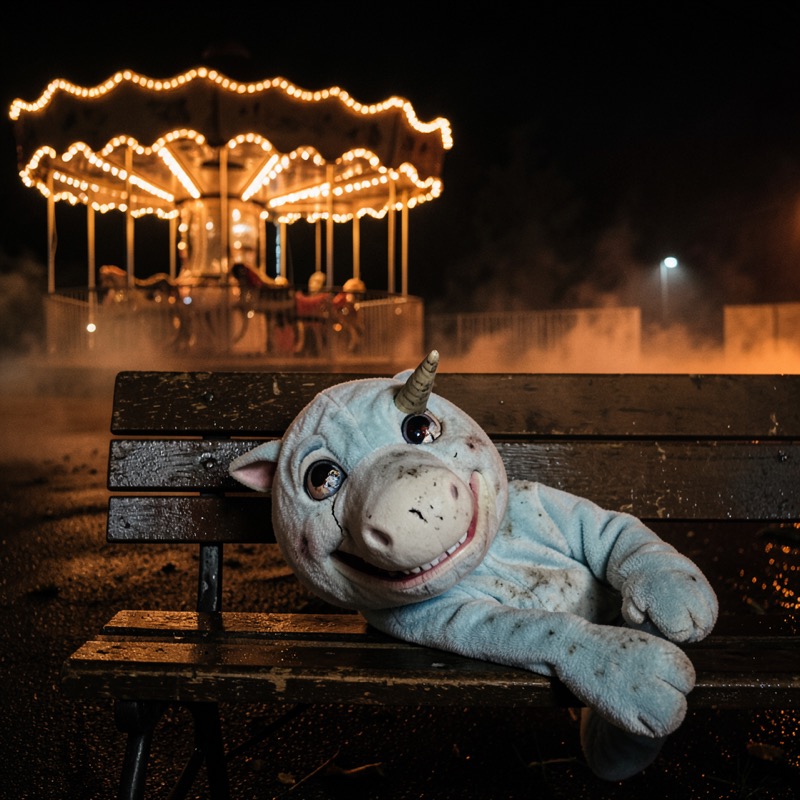
Closed-Season Mascot
A grubby, grinning unicorn mascot suit slumped on a bench at an abandoned fairground. A nod to this year's Buddy the Unicorn mascot-horror craze, with an original costume.
Text-to-video prompt · Kling 3.0
One continuous shot at night in an abandoned small-town fairground. A grubby pale-blue unicorn mascot costume with a single stubby horn, a cracked wide grin and glassy eyes sits slumped and motionless on a wet wooden bench, a dim carousel glowing behind it. The camera pushes in very slowly from a wide shot toward the mascot. Half-broken string lights buzz overhead and one bulb pops. In the final second, the mascot's head tilts a few degrees toward the camera. Wet asphalt, light ground fog, dim sodium-orange light. Sound: wind through the carousel canopy, a distant out-of-tune music-box melody that slows down, the pop of the bulb. Original costume design, no logos, no gore, no text, no cuts.
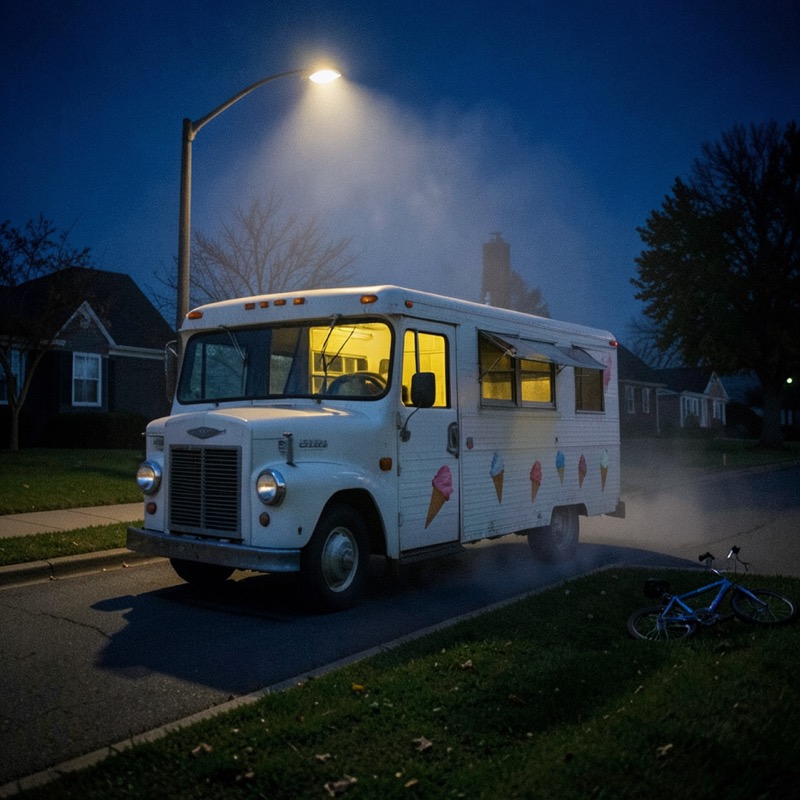
Midnight Chime Van
An old ice-cream van parked on a sleeping street, its chime playing far too slowly. No driver, no customers, and the serving window light is on.
Text-to-video prompt · Kling 3.0
One continuous shot on a quiet suburban street at 2 a.m. An old white ice-cream van with faded painted cones and no brand name is parked under a single streetlight, its serving window glowing dim yellow and the driver's seat empty. The camera is static at the height of a child on the pavement across the street. Mist drifts through the streetlight. Midway through, the van's chime starts playing a slow, detuned nursery-style tune, and a porch light on the nearest house switches off. Deep blue night, soft sodium light. Sound: crickets, the warped chime, a dog barking once far away. No people visible, no lettering, no gore, no cuts.
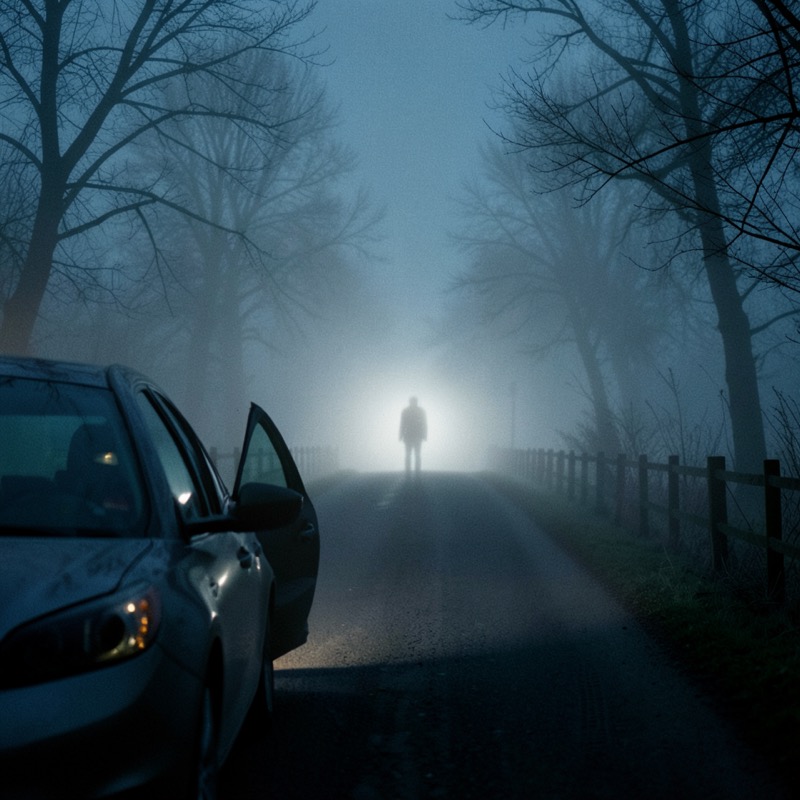
Whisper on the Fog Road
A stopped car on a country road, headlights cutting into thick fog. Something tall stands where the beam fades, and you hear it before you see it.
Text-to-video prompt · Kling 3.0
One continuous shot at night on a narrow two-lane country road in thick fog, seen from just behind a stopped car with the driver's door open and the engine idling. The headlight beams light a wooden fence, bare trees and drifting fog. Far ahead, at the edge of the beam, a tall, featureless human silhouette stands still. The camera creeps forward slowly at shoulder height; the fog thickens and the silhouette is no longer there. Cold blue-grey palette, headlight glare, film grain. Sound: idling engine, the door-open chime, then a close, unintelligible whisper right beside the camera. No face, no gore, no text, no cuts.
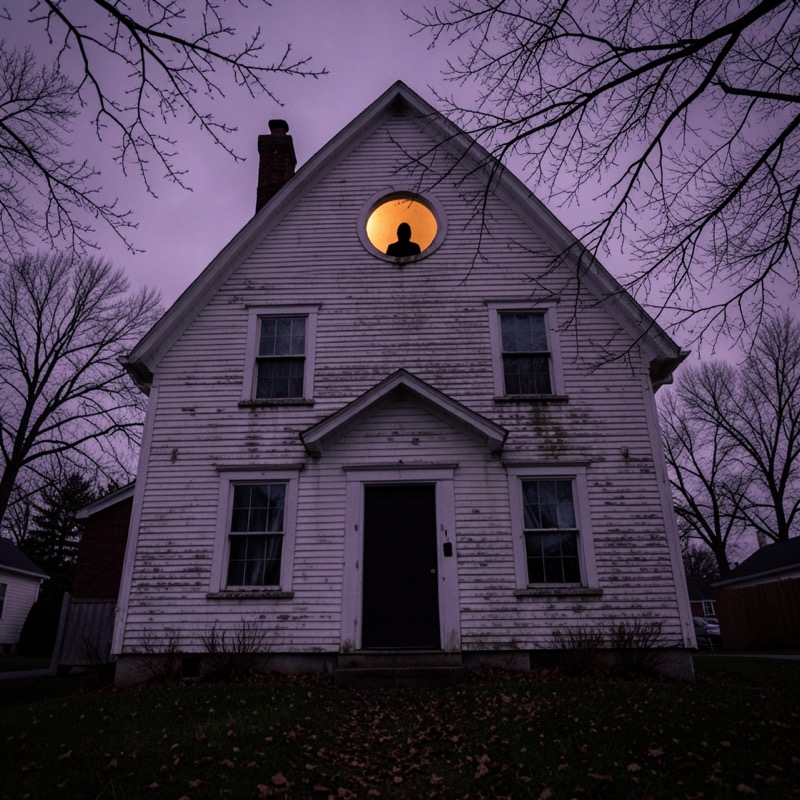
Attic Window Watcher
A peeling farmhouse at dusk with one small attic window lit. A dark figure stands behind the glass — and steps back when the camera gets closer.
Text-to-video prompt · Kling 3.0
One continuous shot at dusk in front of an old two-storey wooden farmhouse with peeling white paint. A small round attic window glows faint amber, and a dark, featureless silhouette of a person stands behind the glass, perfectly still. The camera starts on the front lawn among dead leaves and slowly pushes in and tilts up toward the attic window. As the camera gets closer, the silhouette slowly steps back from the glass and the amber light goes out. Overcast purple sky, bare oak branches moving in the wind. Sound: wind, dry leaves scraping, a single floorboard creak from inside the house. No face, no gore, no text, no cuts.
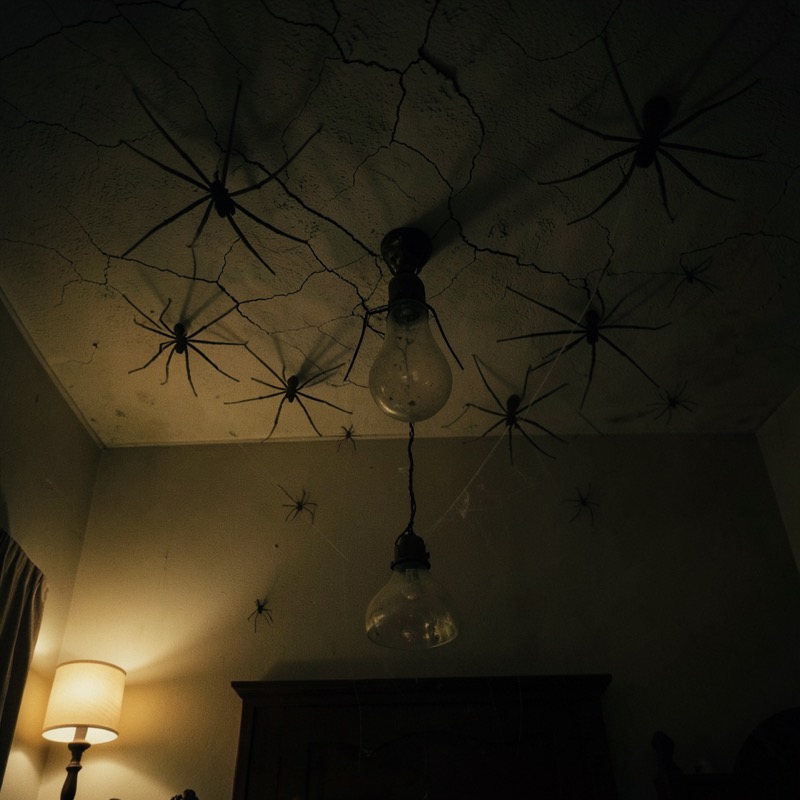
Ceiling Crawlers
You look up from bed and the ceiling is moving. Spider horror in the spirit of the classic creature feature, kept realistic and bloodless.
Text-to-video prompt · Kling 3.0
One continuous shot from a bed, looking straight up at the cracked plaster ceiling of an old bedroom at night, lit only by a warm bedside lamp. A dozen dark, long-legged house spiders spread slowly across the ceiling from one corner, gathering around a dusty glass lampshade; their shadows stretch large across the plaster. The camera holds still, then makes a slight nervous tilt toward the dark corner they came from. Thin cobweb strands catch the light. Realistic spiders, natural movement, no insects on people, no bites, no gore. Sound: a quiet ticking clock, a faint dry skittering that grows louder. No text, no cuts.
The card images are key frames made during testing with an open image model (FLUX.2 klein) running locally, to show each scene's composition. They are not frames from Kling videos; your clip is generated by Kling 3.0 from the prompt and will differ.
Render your horror scene with Kling 3.0
"Use this look" loads the scene prompt and Kling 3.0 text to video. Start with 3 seconds to check the camera move and the scare, then render 5 or 10 seconds once it works. Switch to 9:16 for Reels and TikTok or 16:9 for a wider frame before you generate.
Add inputsAttach images, videos, or audio that are part of what you want to create.
0/2
JPG, PNG, WebP · 20 MB max
0/3
MP4, WebM, MOV · 100 MB max
0/3
MP3, WAV, M4A, FLAC · 50 MB max
Just add the material you need. The generator will use it automatically.
0 / 5000
Start with Kling 4.0 and preview the credit cost before generating. 36 welcome credits cover two 3-second Kling 4.0 videos at 720p, or three with Kling 3.0.
Every scene is a text-to-video prompt for Kling 3.0: pick a card, press "Use this look" and the prompt and model load into the studio below.
Dread beats gore: one slow camera move, one wrong detail and a sound cue make a better 5-second scare than monsters and blood.
Kling 3.0 costs 4 credits per second here (12 credits for 3 seconds, 20 for 5), and the welcome credits cover three 3-second test clips.
The pictures on the cards are key frames made locally to show the composition; the video itself is rendered by Kling 3.0 when you generate.
Why short AI horror clips work, and how to write them
A 3- to 10-second clip cannot tell a story, but it can hold one wrong moment. Every scene above follows the same pattern: an ordinary place, a slow camera move that makes you wait, one small change near the end, and a sound you do not expect. That structure also suits Kling 3.0, which handles a single clear action and a steady camera far better than a crowded sequence of events.
Choose an ordinary place. An office corridor, a suburban street or a bedroom. The more familiar the setting, the stronger the unease.
Make the camera wait. A slow push-in, a creeping walk or a locked-off shot. Avoid fast cuts and shaky handheld movement.
Change one thing late. A light goes out, a head tilts, a figure steps back. Put the change in the last second or two.
Write the sound. Kling 3.0 includes sound in the quote, so describe it: a buzz, a chime, a whisper, then silence.
Inspired by the 2026 horror slate, not copied from it
Search interest this October is shaped by the year's horror releases: liminal-space corridors after The Backrooms, mascot horror around Buddy, Ice Cream Man, The Whisper Man and the return of Arachnophobia. The scenes on this page capture the mood people are searching for with original locations, an original mascot costume and no film titles, characters or logos in the prompts.
Keep it that way when you edit. Naming a film or a franchise character in a prompt rarely improves the result, and posting a clip that copies a protected character or logo can get it removed. Describe what you want to see instead: "a grubby pale-blue unicorn mascot with a cracked grin" works better than a name.
Settings that suit horror clips
Kling 3.0 renders at 720p in 3, 5, 10 or 15 seconds, at 4 credits per second in Koor AI. A few practical choices:
3 seconds (12 credits) to test whether the camera move and the change read clearly.
5 seconds (20 credits) for most social posts; the slow build needs the extra time.
9:16 for TikTok, Reels and Shorts; 1:1 for feeds; 16:9 if you plan to cut several scenes into one trailer.
Leave sound on. Silence plus one sharp noise is the cheapest scare there is, and turning sound off does not lower the price.
Change one detail per take, so you know what made the difference.
Keep it scary, not graphic
Every prompt here ends with "no gore", and that is deliberate. Implied threat — a silhouette, a whisper, a shadow that moves — is scarier in a few seconds than anything explicit, and it keeps the clip suitable for the platforms where Halloween videos are shared. Koor AI's acceptable-use policy rules out graphic violence and gore, impersonation of real people and copyright or trademark infringement, and prompts are screened before any credits are reserved — so a prompt that leans on blood or a famous monster may simply be blocked.
Frequently asked questions
Is there a free AI horror video generator?
New Koor AI accounts get 36 welcome credits, enough for three 3-second Kling 3.0 clips. Use them to test a scene before rendering longer versions.
Do I need to upload a photo?
No. These scenes are text-to-video prompts, so the prompt alone is enough. If you already have a still you want to animate, switch to Kling 3.0 Image to Video and describe only the motion.
Are the card images taken from the videos?
No. They are key frames made locally with an open image model to show the composition. Kling 3.0 renders its own video from the prompt, so framing and details will differ.
Can I use film titles or famous monsters in the prompt?
Avoid them. Describe the mood and the design in your own words instead. It gives the model clearer instructions and avoids posting clips that copy protected characters.
How long should a horror clip be?
Test at 3 seconds, then render 5 or 10. Slow dread needs time, but beyond 10 seconds a single-scare scene usually starts to drag.
Can I add a title or a date like "Oct 31"?
Add on-screen text in a video editor afterwards. Generated text inside the video is often misspelled.
Updated 2026-10-20. Koor AI is an independent video studio, not affiliated with or endorsed by Kuaishou or Kling AI. Kling model names belong to their respective owners. Each generation uses the model selected in the workspace.